Desynced

Is Desynced down?

0new reports
0reports on the chart

What issue are you having?

No new reports about Desynced.

Reports for Desynced over time

How to check whether Desynced is down

The chart has no reports for the period shown. If the error keeps happening, share the time and symptoms in the discussions so other players can compare.

High ping or disconnects in Desynced

Report lag if your actions are delayed while you stay connected. Report a connection problem if you can’t join a server. If the session starts and the connection drops later, report a disconnect.

If the error happens on one server, find it under Servers and check its availability.

Downloads, launch and sign-in for Desynced

If a download stops, check the download queue and available storage on your device. Use the form to report a download, installation or launch problem. If the game or app opens and you can’t access your account, report a sign-in issue.

To report a problem, choose a reason above. You can select several reasons. The chart counts them as one report.

Player posts

Desynced
0 / 5,000
News

Desynced's experimental 1.0.18352 adds a human campaign

Desynced's experimental 1.0.18352 update adds a human campaign with 3 large missions. The campaign needs the end-game "Allow Race Selection" feature and a new game. The notes are dated October 13, 2026. The patch also covers tooltips, construction, components, multiplayer, and fixes.

New human campaign

  • 3 large missions, played as human with the end-game "Allow Race Selection"; new game required.
  • Research-style popup when a technology unlocks outside tech research, e.g. first Robotics Datacube.
  • More custom icons for integrated components, distinct from socketed.

Tooltips, construction, and components

  • Copy buildings with C: auto-start construction cursor; clicking a building offers upgrade config or apply copied settings; better confirmation for unit↔building setting pastes.
  • Construction sites: unrelated items no longer under Requirements; if any, a full drag-out inventory appears.
  • Foundation speed bonuses rounded up: 111→115%, 143→150%, 167→175%.
  • Player-built Command Center bots get deployment, matching human Landers.
  • Mothership Repair returns the most-needed ingredient, not ingredient order.
  • Item tooltips: integrated production/mining components shown as " on "; production padlock hidden; "Research Required" hidden if items can be made/acquired by mining, extracting, converting, re-simulating, or catching; shown above producer list in yellow; "Re-Simulated by" only after Re-Simulator unlock; Robotics Datacube treated as known when seen as Gateway Technology ingredient; discovery hints for Blight Bar, Human Datacube, Alien Datacube; no padlocks for unknown ingredients of researched items; hint that Anomaly Particles can be caught in anomaly slots when mining blight crystals nearby.
  • Unit/building tooltips show integrated component item slots (e.g. anomaly containers, satellite launchers) beside regular slots.
  • System Index "Research" on an integrated component finds the research of the building/unit it is integrated on.
  • "Human" prefix removed from human-tech or human-built units/buildings.
  • Renames: Repair Component→Repairer; AOE Repair Component→AOE Repairer; Small AOE Repair Component→Small AOE Repairer; Robot Re-Simulation Component→Re-Simulator Component; Drone Component→Internal Drone Port; Alien Power Nova Component→Blight Power Nova Component; Re-Simulator Core→Simulation Core. Spelling fixed to "Re-Simulator".
  • "Human Data" tech description mentions faction-wide blight shield, like "Blight Stability".
  • "How to Play" codex pages for human and alien factions; Re-Simulator cutscenes only for robot factions; race color backgrounds removed behind integrated component icons on registers and System Index.
  • System Index tech pages get a button to the tech tree.
  • Behavior instructions: "Compare Number" lists results for >, <, greater/larger/less/smaller; "Activate" lists results for Launch/Land and explains supported components.
  • Stealth shader Fresnel effect keeps stealthed units visible on Low effect quality.

Multiplayer, missions, and balance

  • Multiplayer with a robots faction: non-robots lose mission map pins/notifications; robot side-mission explorables (e.g. abandoned mining base) are non-interactable for non-robot factions.
  • Simulation Core and Human Simulation Core no longer auto-unlock from a Dense Anomaly Cluster; they unlock only when a robot faction picks it up for "Human Discovery" step 4, while non-robot factions use regular research.
  • Blight Bar no longer unlocks on Blight Research tech; it already unlocks via Blight Discovery.
  • "Human Building" explorable's 4 buildings spawn in random corners, not always warehouse north-east.
  • Radar scans for special things like the mothership are no longer instant; they need usual radar work time.
  • Anomaly Particle catch chance by nearby units +50%; miner local catch chance unchanged.
  • Human Lander visibility range increased to 20 to match its integrated power field.
  • Main-story map setting now only appears when customizing main "Freeplay" (or modded) settings; hidden in demo because it does nothing.

Fixes

  • Avoid new bugs after enemies are turned off in settings.
  • Keep internal re-simulated flags on components when relocating buildings.
  • Fix upgrading existing buildings/construction sites with new construction from the build menu.
  • Fix register links for integrated production/mining components when customizing new building construction, unit production, or blueprints (e.g. Human Refinery, Miner Mech).
  • Fix logged Lua errors when selecting an empty tile to shoot and when destroying Anomaly Base during "Make Producer".
  • Fix Human Shuttle health bar appearing near the ground instead of on the unit.
  • Fix rendered items not updating when swapping two stacks on buildings/units.
  • Fix missing inventory slots on some human buildings.
180
News

Desynced roadmap and behavior overhaul land in 1.0.18154

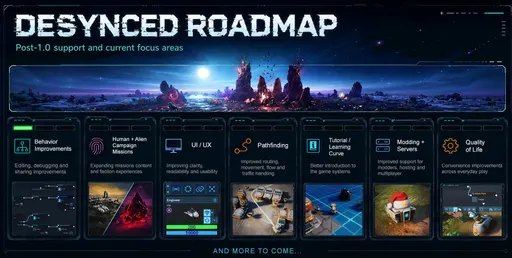
Desynced’s post-1.0 development push continues with a fresh roadmap and the 1.0.18154 patch. The roadmap targets the biggest player feedback areas, starting with the Behavior system, but is not a strict order or timeline. The Experimental branch remains the first stop for new features, with larger additions moving to the main branch once they’ve been tested and stabilized.

Behavior editor and automation changes

The bulk of 1.0.18154 improves behavior editing and debugging:

  • Windowed editor mode that still allows map and unit control
  • Guided behavior tutorials from the behavior help welcome screen
  • Faction-wide memory as an option for all memory behavior instructions
  • Single-array deletion in the Memory Viewer
  • Performance statistics for behaviors, including instructions executed per second
  • Editor camera/zoom controls and transparency so the game view shows behind it
  • Instruction search that matches English names in other languages, ignores spaces, and recognizes aliases
  • Overhauled instruction categories: Flow, Logic, Loops, Values, Units, Movement, Inventory, Logistics, Components, Production, Communication, World, Memory

Failures no longer stop a behavior outright; it stays paused so the crash can be inspected in the editor. Behavior unlocking has also been reworked: unlocked behaviors reset unlock state on restart, unlock instructions can set limits and “Pause on limit”/“Continue next tick” modes, and servers can cap total unlocked instructions.

New instructions include Return, Loop Coordinate, Category Switch, Memory Sift, Check Logistics, Get Grid Info, Loop Ingredients, Compare Data, and Loop Researched.

Instruction consolidation and renames

Many instructions were renamed, merged, or converted automatically. Highlights: Set Number/Set Data/Combine Coordinate became Combine, Separate Coordinate became Separate, Compare Item/Compare Unit became Compare Type/Compare Data, and Loop Repair/Recipe/Research Ingredients merged into Loop Ingredients. Get Grid Efficiency became Get Grid Info, Modulo folded into Divide’s new remainder output, and remote equip options are now arguments on the base equip instructions. Connect/Disconnect and transport-route instructions convert to Set Logistics.

Other behavior improvements: many instructions now work on allied units, dropped items, and unlocked explorables; Place Construction supports multi-building blueprints; Notify and Set Signpost support custom tags; Break can exit multiple loops; Wait Ticks accepts “infinite”; and Distance returns infinite for off-map targets like the Mothership.

Production, logistics, and world changes

  • Assembler can now be produced in the Human Factory
  • Metal Bar, Metal Plate, and Reinforced Plate can be produced in the Reforming Pool
  • Power Petal and Phase Leaf can be produced in the Pylon
  • Recipes for Alien Factory and Hybrid Worker changed
  • Alien Pincer lost its four docking garage item slots
  • Buildings renamed to match actual size at default rotation: “Building 2x1” to “Building 1x2,” “Building 3x2 (2M2S)” to “Building 2x3 (2M2S)”
  • New game option to disable story popups; tooltips close with Esc
  • 400 recently added strings temporarily localized via machine translation

Fixes and modding

Notable fixes include multiplayer desync issues around docking and teleporters, a follow-camera crash when the followed unit is destroyed, hidden enemies no longer being revealed through behavior notifications or shift-clicking registers, Scout Radar no longer granting free visibility when rapidly equipped/unequipped, and order carriers properly using items already held instead of grabbing from nearby buildings.

Modding changes: the Lua register methods raw_is_empty and RawEqual were removed, and the OrderItem rules changed—ManualOrder no longer auto-equips components unless AutoEquipComponent is specified, and omitting ManualOrder no longer reduces requested amounts automatically.

Image 1
706
News

Experimental Desynced 1.0.18152 restores Reforming Pool and fixes old saves

The latest Desynced experimental build, 1.0.18152, is out. It corrects several issues introduced in the previous patch and adds custom icons for integrated components.

Additions

New custom icons are now available for:

  • The integrated Intel Scanner on the Human AI Explorer unit.
  • The integrated Power Transmitter on the Human Power Plant building.
  • The integrated Blight Extractor on the Blight Complex building.

Fixes

  • Distance instruction: measuring against something not on the map, such as the Mothership, now returns infinite instead of logging a Lua error.
  • Reforming Pool: Metal Bar, Metal Plate, and Reinforced Plate are back in its production list after being mistakenly removed in the last patch.
  • Transformer unlock: alien player factions can again unlock the Transformer item when a human explorable is unlocked with Crystalized Obsidian.
  • Old saves: integrated components changed in 1.0.18142 no longer duplicate when the Blight Complex or Human AI Explorer is relocated or deployed.
  • Visual register links: default links of integrated components, such as the production register on the Blight Complex, are no longer recreated when relocating a building.
667
News

Desynced experimental 1.0.18142: number formatting and bug fixes

Desynced's latest experimental branch update, 1.0.18142, was published on August 24, 2026. The Control Center item detail tab and Progress window milestone tab now show numbers with a comma thousands separator.

Also fixed in this build:

  • Construction sites on top of a dropped item no longer fail when that item has been partially picked up (regression from 1.0.18020).
  • New explorables are now marked as visited when scanned with an Intel Scanner component, even if the scan is aborted.
698
News

Desynced 1.0.18104 fixes building sizes and rotation

Desynced's latest experimental build, 1.0.18104, renames buildings to match their actual size at default rotation and undoes the non-square rotation change from 1.0.18055.

Building naming and rotation

  • All "Building 2x1" entries are now "Building 1x2"; "Building 3x2 (2M2S)" is now "Building 2x3 (2M2S)".
  • New constructions of non-square buildings no longer default to being rotated wider than tall, reversing the previous build's change.

Behavior and localization

  • "Get Unit Info" now returns actual underlying width/height data instead of always reporting width as the larger number, matching what "Place Construction" builds with default rotation.
  • Added 400 recently added and modified strings, temporarily localized via machine translation.

Fixes

  • Fix logging of a Lua warning when opening the Codex.
  • Fix logging of a Lua error when double-clicking the Program Start node in the behavior editor.
813
Show all